
How can we help?
AI Biographies
AI Biographies (Pro) help you turn a person’s facts into a readable life story that appears on their person page. You can also paste in a biography you wrote yourself.
What you need
- ForeBranch Pro, active and licensed.
- For AI generation: an account and API key with one of the supported providers. ForeBranch does not supply keys.
Supported providers:
- Google Gemini
- OpenAI
- Anthropic (Claude)
- Groq
- Perplexity
Step 1: Set up your provider
- Create an account with your chosen provider and copy your API key.
- Go to ForeBranch → Dashboard → Configuration and find AI Biographies.
- Tick Enable AI biography generation.
- Choose your Biography AI provider.
- Paste your key into Biography API key.
- Click Save Settings. The screen confirms “Key saved for this provider.”
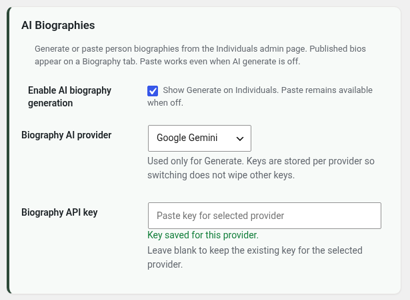
Keys are stored per provider, so switching providers does not wipe your other keys. To keep an existing key, leave the box blank when saving.
Step 2: Generate a biography
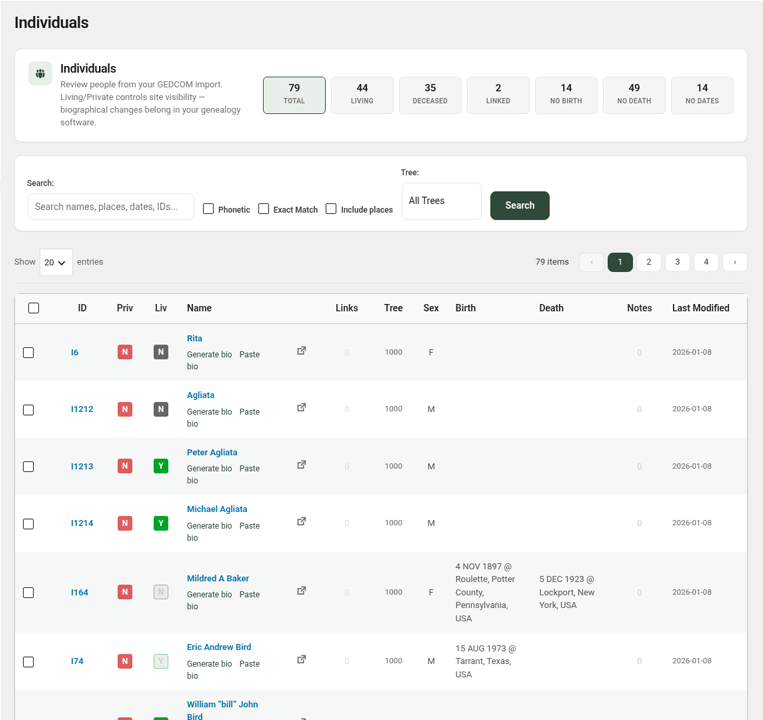
- Go to ForeBranch → Individuals.
- Find the person.
- Click Generate bio under their name.
- Review the biography and publish it.
Or paste your own biography
- Go to ForeBranch → Individuals.
- Click Paste bio under the person’s name.
- Paste or type your text and publish it.
Paste bio works even when AI generation is turned off. Use it if you prefer to write biographies yourself or with another tool.
Where biographies appear
- On the person page’s Biography tab.
- On the LifePath tab, through the Read full biography link.
Privacy and what is sent
- When you click Generate bio, ForeBranch sends prompt text based on that person’s data and events to the provider you selected, and only that provider.
- No AI calls are made unless you run generation with a key configured.
- Each provider has its own terms and privacy policy. Review them before you start, especially for people who may still be living.
- Any usage charges are between you and your provider.
Tips for good results
- The more complete the person’s dates, places, and events, the richer the biography.
- Always read a generated biography before publishing and correct anything that does not match your research.
- Turn off Enable AI biography generation to hide the Generate option while keeping Paste available.