How can we help?
Relationship Finder
The Relationship Finder (Pro) answers the question every relative asks: “How are we related?” It explains how two people in your tree connect, such as cousins or aunts and uncles.
Turn it on
- Go to ForeBranch → Dashboard → Configuration.
- Under Comments & Visitor Interaction, tick Show “How are we related?” on person pages.
- Click Save Settings.
Find a relationship
- Open any person page.
- Click How are we related? at the top of the page.
- In the dialog, search for a person in the same tree.
- Choose the person from the results.
- Click Find relationship. The button becomes available once you have chosen someone.
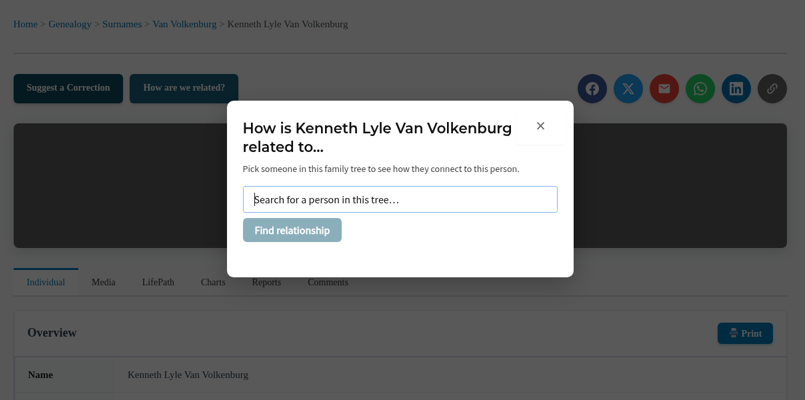
ForeBranch explains how the chosen person connects to the person you are viewing. Click × to close the dialog.
Good to know
- The finder works within one tree. Both people must be in the same tree.
- The relationships come from the family links in your GEDCOM. If a connection is missing, add the link in your genealogy software and re-import.
Ideas for using it
- Share a person page with a relative and invite them to find their own connection.
- Use it at family reunions to settle “how exactly are we cousins?” questions.