Genealogy Hub
The genealogy hub is the front door to your family history: a single page that welcomes visitors and points them to everything in your tree.
It lives at yoursite.com/genealogy/. To open it from the admin, click View frontend under Quick actions on ForeBranch → Dashboard.
What visitors see
Heading and tree filter
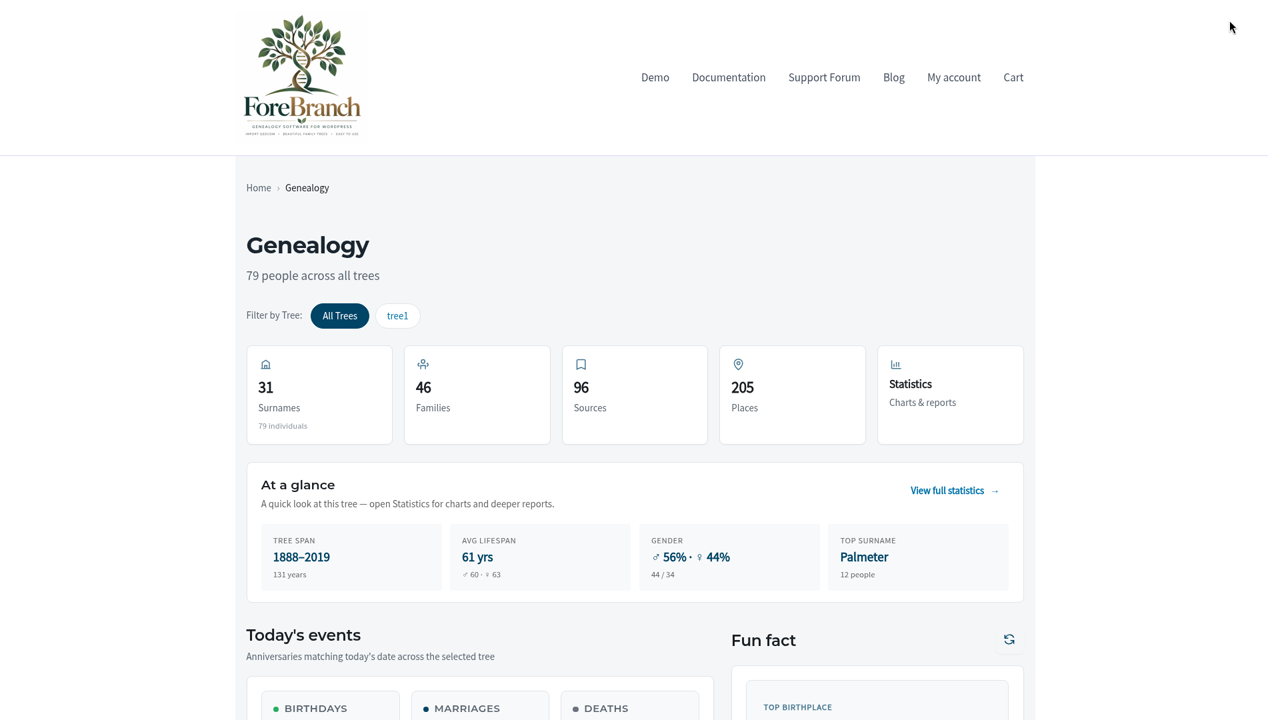
The page opens with the heading Genealogy and a count of people, such as “79 people across all trees”. If you have more than one tree, Filter by Tree lets visitors view all trees or just one. Each tree also has its own hub address, /genealogy/tree/<tree>/.
Navigation cards
Cards with counts link to each section of your site:
- Surnames – the surname index.
- Families – the family list.
- Sources – the source list.
- Places – the place list.
- Statistics – charts and reports (Pro).
At a glance
A quick look at the tree, with a View full statistics link:
- Tree Span – the range of years covered.
- Avg Lifespan – overall and by gender.
- Gender – the male/female split.
- Top Surname – the most common surname and how many people share it.
Today’s events
Anniversaries matching today’s date across the selected tree: Birthdays, Marriages, and Deaths.
Fun fact (Pro)
A rotating fact about your family, such as an immigrant ancestor or a “sibling champion”. Visitors click Refresh fun fact to see another. Some facts link to matching people; for example, “One of 5 immigrants” opens a search for immigrant ancestors.
The statistics and fun-fact blocks are controlled by Show interesting statistics under ForeBranch → Dashboard → Configuration → What to Show & Hide.
Add the hub to your site menu
- Go to Appearance → Menus in WordPress (or use the shortcut card Add genealogy to your menu on the Dashboard).
- Add a Custom Link with the URL yoursite.com/genealogy/ and a label such as “Family Tree”.
- Save the menu.
If you use a block theme, add the link with your theme’s navigation block in the Site Editor instead.
Privacy on the hub
Living and private people are protected throughout the public site: visitors see “Private” in place of their name, dates, and places. Administrators see everyone. See Configuration Settings for how ForeBranch decides who is living.
Changing the look
With Pro, choose a design style, page width, or match your WordPress theme under Configuration → Appearance & Design.