
How can we help?
Account & License
The Account screen is where you manage your ForeBranch Pro license, account details, and billing.
Open it from ForeBranch → Account. This is the only place your license is managed; there is no License tab on the Dashboard.
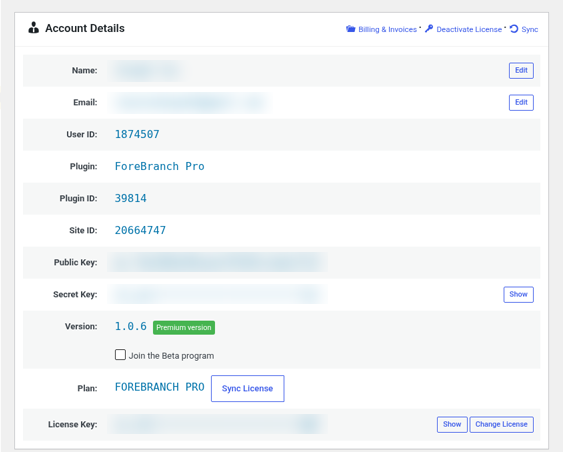
Account Details
This section shows:
- Name and Email – click Edit to change them.
- User ID, Plugin ID, Site ID, Public Key, and Secret Key – reference details for your account. Click Show to reveal the secret key.
- Plugin – ForeBranch Pro.
- Version – the installed version of ForeBranch Pro.
- Plan – shows FOREBRANCH PRO when your license is active.
- License Key – click Show to reveal it or Change License to enter a different key.
- Join the Beta program – tick this box to join the ForeBranch Pro beta program.
Common tasks
Refresh your license status
- Go to ForeBranch → Account.
- Click Sync License beside the Plan (or Sync at the top).
Do this after renewing or changing your plan if the screen has not updated.
Use a different license key
- Click Change License beside License Key.
- Enter the new key and confirm.
Move Pro to another site
- On the old site, go to ForeBranch → Account and click Deactivate License.
- On the new site, install and activate ForeBranch and ForeBranch Pro, then enter your license key.
Billing & Invoices
- Click Billing & Invoices.
- Click Edit to update your billing country and address.
- In the payments table, click Invoice beside any payment to view it.
Building a site for someone else?
A notice at the top asks “Is this your client’s site?” Click it to hide sensitive information such as your email, license key, prices, billing address, and invoices from the WordPress admin.
Buying or renewing
ForeBranch Pro is available as Pro Yearly or Pro Lifetime. See forebranch.com for current pricing. Your license key is emailed to you after purchase.