
How can we help?
Sources
The Sources screen lists the sources imported from your GEDCOM, such as records, books, and websites you cited in your research.
Open it from ForeBranch → Sources. This is a read-only list: edit sources in your genealogy software, then re-import.
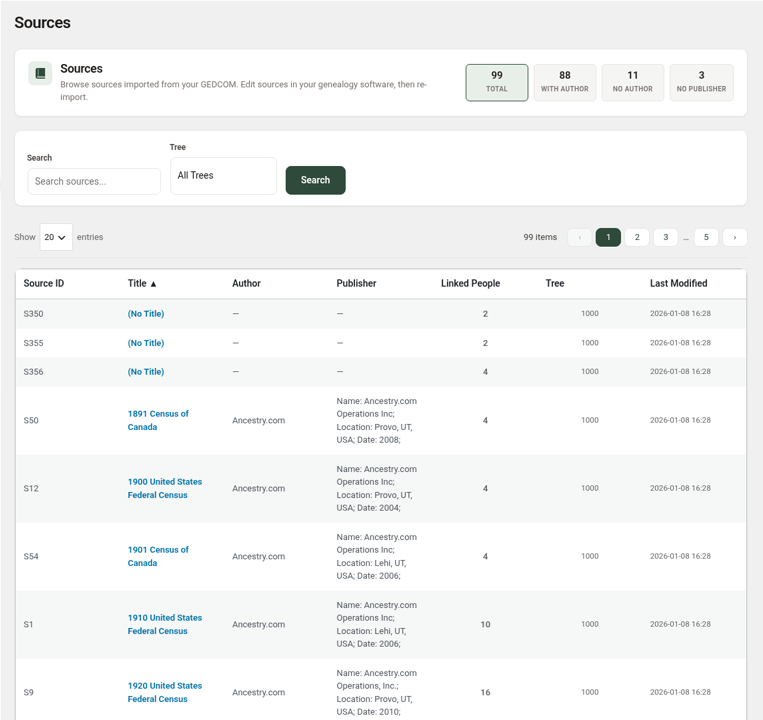
Filter tiles
- Total – all sources.
- With Author and No Author
- No Publisher
These tiles are a handy way to spot sources that could use more detail in your genealogy software.
Find a source
- Type in Search (for example, part of a title).
- Choose a Tree, or leave it on All Trees.
- Click Search.
Use Show 10/20/50/100 entries to change how many sources appear per page.
The list columns
- Source ID
- Title – click to open the public source page on your site. Untitled sources show “(No Title)”.
- Author and Publisher – a dash (—) means the field is blank.
- Linked People
- Tree and Last Modified
Click any column heading to sort.
Sources on the public site
Visitors can browse sources at /genealogy/sources/. Each source page shows its ID, title, author, and publisher, plus the individuals associated with it. On person pages, citation numbers such as [1,2] link to the numbered Sources list at the bottom of the Individual tab.
Updating sources
- Edit or add the source in your genealogy software.
- Export a new GEDCOM.
- Re-import it with ForeBranch → Import using Update tree.