
Database Utilities
The Database tab lets you check the health of ForeBranch’s data and run maintenance or cleanup tasks.
Open it from ForeBranch → Dashboard → Database.
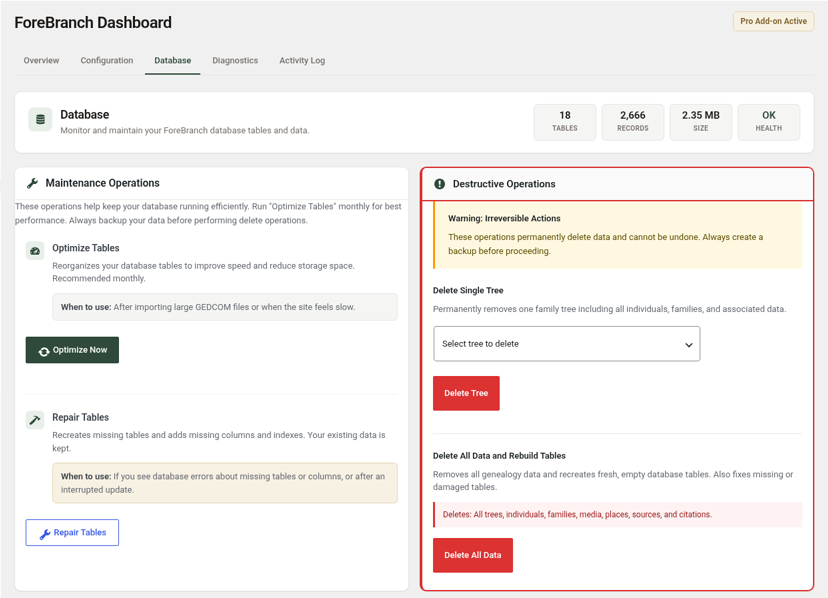
At a glance
Four tiles at the top show the number of ForeBranch Tables, the total Records, the database Size, and overall Health (for example, OK).
Maintenance operations
These tasks keep the database running smoothly and do not remove your data. Back up before any delete operation.
Optimize Tables
Reorganizes your ForeBranch tables to improve speed and reduce storage space. It is recommended monthly, after importing large GEDCOM files, or when the site feels slow.
- Go to ForeBranch → Dashboard → Database.
- Under Optimize Tables, click Optimize Now.
Repair Tables
Recreates missing tables and adds missing columns and indexes. Your existing data is kept. Use it if you see database errors about missing tables or columns, or after an interrupted update.
- Go to ForeBranch → Dashboard → Database.
- Under Repair Tables, click Repair Tables.
Destructive operations
Warning: these actions permanently delete data and cannot be undone. Always back up your database first.
Delete Single Tree
Permanently removes one family tree, including all its individuals, families, and associated data.
- Back up your database.
- Choose the tree from Select tree to delete.
- Click Delete Tree.
Delete All Data and Rebuild Tables
Removes all genealogy data and recreates fresh, empty database tables. It deletes all trees, individuals, families, media, places, sources, and citations. It also fixes missing or damaged tables.
- Back up your database.
- Click Delete All Data.
- Re-import your GEDCOM files afterward to rebuild your site.
Database Statistics
The table at the bottom lists every ForeBranch table with its Records, Size, and Status (a check mark, or Empty when the table has no rows). Tables are named with your site’s table prefix, for example wp_forebranch_individuals, wp_forebranch_families, wp_forebranch_places, and wp_forebranch_sources. An empty table is normal when you do not use that feature.
Which tool should I use?
| Situation | Use |
|---|---|
| Site feels slow, or you just imported a big file | Optimize Tables |
| Errors about missing tables or columns | Repair Tables |
| You want to remove one tree completely | Delete Single Tree (or Trees → Edit → Danger zone) |
| You want to start over from scratch | Delete All Data and Rebuild Tables |