
Surnames, Families, Places & Sources Pages
Besides person pages, ForeBranch builds four browsable index pages so visitors can explore your tree by surname, family, place, or source.
Each page has a breadcrumb trail (Home > Genealogy > …) and, if you have several trees, a Filter by Tree option.
Surnames
Address: /genealogy/surnames/
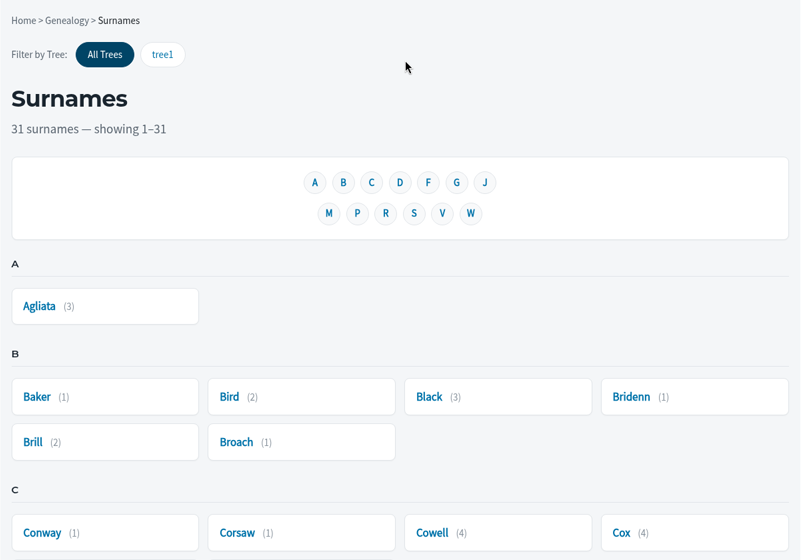
- A count at the top, such as “31 surnames”.
- A–Z jump links for each letter that has surnames.
- Surnames grouped alphabetically, each with the number of people, for example “Palmeter (12)”.
A surname page
Click a surname to open its page, for example /genealogy/surnames/Palmeter/. It lists everyone with that surname as “Name (birth – death)”. Click a name to open the person page.
Families
Address: /genealogy/families/
- A table with Spouse 1, Spouse 2, Marriage, and Children (with birth years).
- Search by surname to find a family.
- Sort by Spouse 1 Surname, Spouse 2 Surname, Marriage Date, or Children.
- Per page: 10, 25, 50, or 100.
- Enter a surname and/or choose sort and per-page options.
- Click Apply.
- Use First, Prev, page numbers, Next, and Last to move through the list.
Places
Address: /genealogy/places/
Place names are shown exactly as they were recorded in the family tree.
- A table of Recorded Place Name and People (how many people are connected to it).
- Search places with the search box.
- An A–Z bar with All and # to filter by first letter.
- Results per page: 20, 50, or 100.
A place page
Click a place to open its page, for example /genealogy/places/PLC0193/. It shows:
- People Associated with This Place, with the number of events for each.
- Location – the stored coordinates, shown as text.
- An Open in Google Maps link (Pro).
- A map, when the place has coordinates (Pro).
The names and coordinates come from ForeBranch → Places. See Places (Pro tools) and Maps & Geocoding.
Sources
Address: /genealogy/sources/
- Each source title with the number of individuals linked to it.
- Search sources and Per page (20, 50, or 100), then Apply.
A source page
Click a source to open it, for example /genealogy/sources/S50/. It shows the Source ID, Title, Author, and Publisher, followed by Individuals Associated with This Source with their birth and death details. Click Back to return.
Privacy on index pages
Living and private people are protected on every list. Visitors see “Private” in place of their details. Public counts can differ from the totals you see in the admin.