
Dashboard Overview
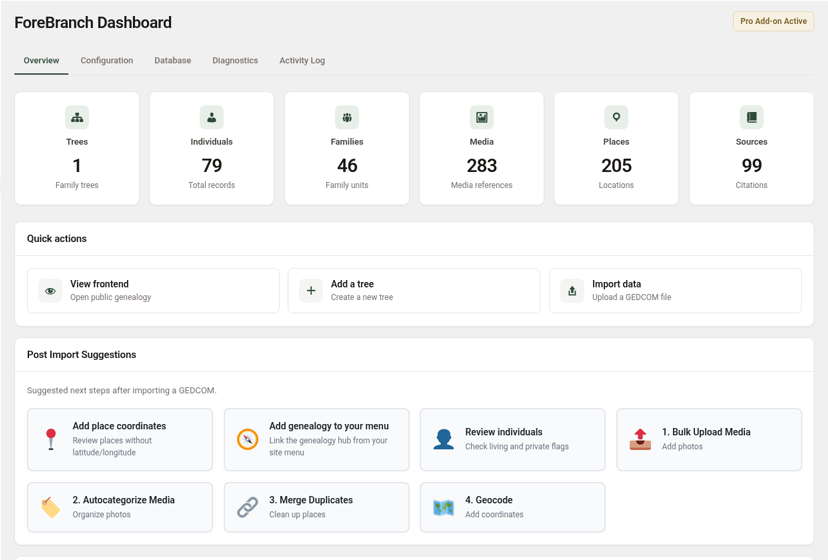
The ForeBranch Dashboard is your home base: it shows what is in your database, offers quick shortcuts, and suggests what to do after an import.
Open it from ForeBranch → Dashboard. When ForeBranch Pro is active, a Pro Add-on Active badge appears beside the page title.
The Dashboard tabs
The Dashboard has five tabs:
- Overview – totals, shortcuts, and suggestions (this article).
- Configuration – privacy, display, and feature settings. See Configuration Settings.
- Database – maintenance and cleanup tools. See Database Utilities.
- Diagnostics – server tests for large imports. See Diagnostics.
- Activity Log – a record of actions taken in ForeBranch. See Activity Log.
There is no License tab on the Dashboard. Your license lives under ForeBranch → Account.
Stat tiles
Six tiles across the top summarize your data. Click any tile to jump to that admin screen.
| Tile | What it counts | Opens |
|---|---|---|
| Trees | Family trees | ForeBranch → Trees |
| Individuals | Total person records | ForeBranch → Individuals |
| Families | Family units | ForeBranch → Families |
| Media | Media references | ForeBranch → Media |
| Places | Locations | ForeBranch → Places |
| Sources | Citations | ForeBranch → Sources |
Quick actions
- View frontend – opens your public genealogy hub at /genealogy/.
- Add a tree – creates a new tree.
- Import data – uploads a GEDCOM file.
Post Import Suggestions
These cards suggest next steps after importing a GEDCOM:
- Add place coordinates – opens the Places list filtered to places without latitude/longitude.
- Add genealogy to your menu – opens Appearance → Menus so you can link the genealogy hub from your site menu.
- Review individuals – check living and private flags.
- 1. Bulk Upload Media – add photos (Pro).
- 2. Autocategorize Media – organize photos (Pro).
- 3. Merge Duplicates – clean up places (Pro).
- 4. Geocode – add coordinates (Pro).
The numbered cards are in the recommended order. In particular, merging duplicate places before geocoding avoids unnecessary lookups.
Help & Documentation
- ForeBranch.com – Visit Website opens the official site.
- GEDCOM Standard – View Specifications opens the GEDCOM specifications at gedcom.io.
- Knowledge Base – View Knowledge Base opens these guides.
Third-Party Attributions
This section lists the open-source libraries and services ForeBranch uses, with their licenses: Leaflet (interactive maps), Chart.js (statistics charts), MapLibre GL (map rendering), OpenStreetMap (map data), Nominatim (geocoding), Google reCAPTCHA (bot protection), and OpenFreeMap (alternative tiles). Click View complete attribution details for the full text.