How can we help?
Statistics (Pro)
The Statistics hub (Pro) turns your tree into interactive charts and insights, from lifespans and family sizes to a data-quality score that shows where your research could use attention.
Address: /genealogy/statistics/. Visitors reach it from the Statistics card on the genealogy hub or the View full statistics link.
Using the page
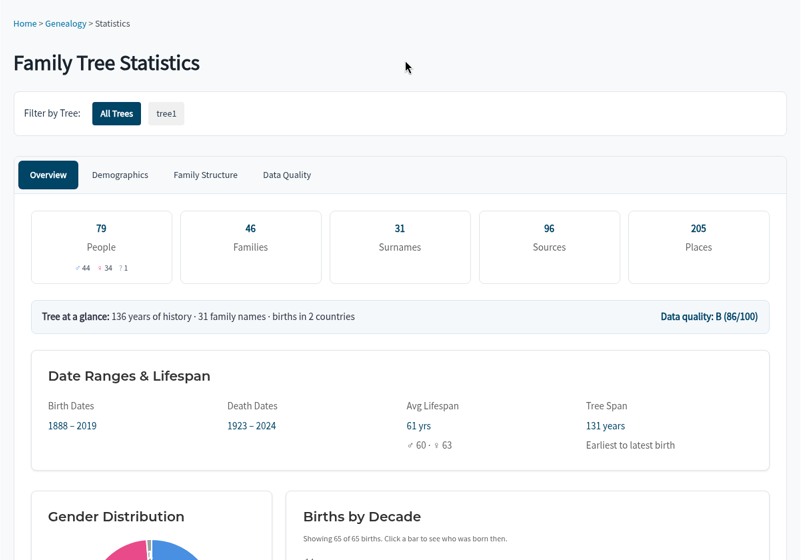
- Filter by Tree to view all trees or one.
- Switch between four tabs: Overview, Demographics, Family Structure, and Data Quality.
- Charts are interactive. Click a bar or tile to see the people behind it.
Overview
- Totals for people (by gender), families, surnames, sources, and places.
- Tree at a glance – years of history, number of family names, and birth countries.
- Data quality grade and score.
- Date Ranges & Lifespan – birth dates, death dates, average lifespan, and tree span.
- Gender Distribution
- Births by Decade – click a bar to see who was born then.
- Top 10 Surnames – click a bar to see everyone with that surname.
- Top Birth Countries, Top Male Names, and Top Female Names
Demographics
- Died Before Age 5, Died Before Age 18, and Centenarians – click to view the people.
- Oldest Men and Oldest Women
- Birth Months and Death Months
- Age at Death
- Average Age at Death by Decade – decades with fewer than 5 deaths are left out.
Family Structure
- Married More Than Once, No Children Recorded, and One Parent Unknown
- Age at First Marriage and Spouse Age Gap
- Mother’s Age at Children’s Births
- Most Marriages and Children per Family
- Average Children by Marriage Decade
- Largest Families and Largest Spouse Age Gaps
Data Quality
This tab is a research to-do list as much as a statistic.
- Coverage – birth date coverage, death date coverage, and complete records.
- Missing information – missing surnames, gender, birth places, and death places.
- Coverage & Connectivity – uncited people, people with no media, unlinked media, isolated people, and ungeocoded places.
- Data Quality Insights – an overall quality score and grade, weighted across dates, places, sources, family links, media, surnames, and gender, with points taken off for data problems.
- Biggest opportunities – with View list links to the people involved.
- Possible data problems – such as impossible dates, unlikely parent ages, or likely duplicates.
- Quick wins – easy fixes, such as people with a birth date but no birth place.
Improving your numbers
ForeBranch only displays your tree. To improve the report:
- Use the lists on the Data Quality tab to find people who need attention.
- Make corrections in your genealogy software.
- Export a new GEDCOM and re-import it with Update tree.
Ungeocoded places can be fixed directly in ForeBranch with ForeBranch → Places → Geocoding.